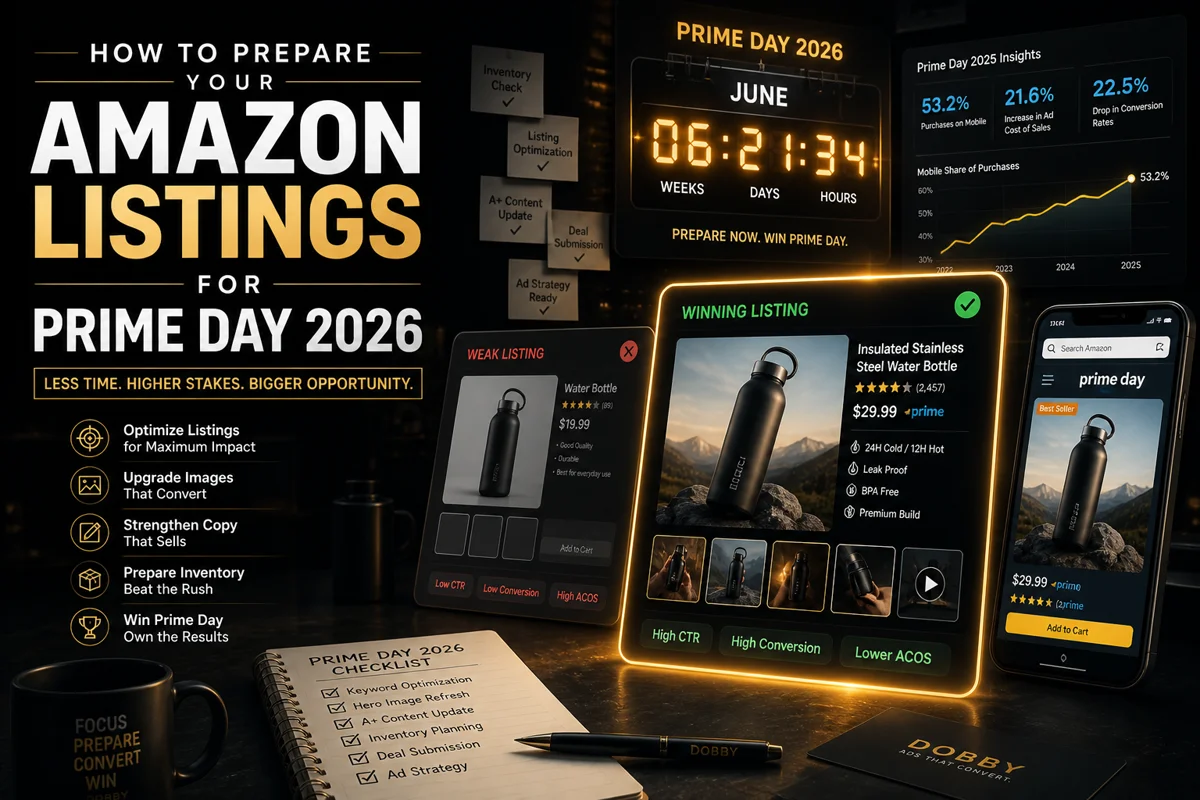
Why Prime Day 2026 Will Be Different
Prime Day moved. For the first time in years, Amazon's biggest sales event is happening in June 2026, not July. Amazon confirmed the shift, with a four-day window expected around late June.
That gives sellers roughly six weeks less runway than last year. If you're using a Prime Day prep checklist from 2025, throw it out. The deadlines have shifted, the inventory cutoffs have shifted, and your listing optimization window just shrank.
A few things have changed since last year that affect how you prep:
- The date shift compresses your timeline. A June event means inventory deadlines, deal submission cutoffs, and creative refresh windows all move forward by about a month.
- Mobile is now the majority. During Prime Day 2025, Adobe Analytics found 53.2% of purchases came from mobile devices. If your listings look great on desktop and mediocre on a phone, you're optimizing for the smaller half of your traffic.
- Ad costs went up. Ad efficiency went down. Advertising cost of sales rose 21.6% year over year, while conversion rates fell 22.5%. Sellers cannot rely on ads alone to win Prime Day anymore. The product page itself has to do more of the work.
- Rufus, Amazon's AI shopping assistant, is now a serious traffic source. Listings with clear, structured copy and detailed A+ content surface in Rufus responses far more often than listings with generic descriptions.
The Single Most Important Idea
Most sellers obsess over the discount. Prime Day shoppers don't.
Prime Day shoppers have already decided to spend. They scan fast, compare visually, and make decisions in under three seconds per product. The deal gets them to the page. Your listing decides whether they buy.
A 30%-off product with a weak hero image loses to a 20%-off product with a strong one. Every time. Which means the highest-leverage Prime Day work isn't your discount strategy. It's your listing creative, copy, and conversion architecture.
The 6-Week Prime Day Prep Timeline
Week 6 to 5: Audit and Plan
Before changing anything, pull the data. Open Brand Analytics → Search Catalog Performance. Identify your top 10 ASINs by traffic and conversion — these are your Prime Day candidates.
Pull your previous Prime Day performance or Black Friday data. Note which listings converted well and which leaked traffic. Run a competitor audit on your top three ASINs on mobile, not desktop. Note hero image style, copy structure, A+ content, and video presence. The deliverable: a shortlist of five to ten ASINs you'll prioritize, plus a one-page note on what's missing from each.
Week 5 to 4: Hero Image Overhaul
The hero image is the single highest-leverage asset on your listing. It's what shoppers see in search results, on the deal carousel, and in Sponsored Product placements. If it doesn't earn the click, nothing else matters.
What to fix:
- Mobile-first sizing. With mobile now driving more than half of Prime Day purchases, your hero image must be readable as a thumbnail. Test it: shrink it to 200 pixels wide. Can you still tell what the product is and why it's worth clicking?
- Pure white background. Amazon requires the main image background to be RGB 255, 255, 255. Enforce this strictly.
- Fill the frame. Product should take up at least 85% of the image. Tiny products in big white space lose.
- No badges, text, or graphics. Save those for slots 2 through 7. Amazon will suppress listings that violate this.
Week 4 to 3: Image Stack and A+ Content
Slots 2 through 7 are where conversion happens. Shoppers who tap your listing scroll these images in seconds, and the order matters. A high-converting image stack typically looks like:
- Hero (main product, white background)
- Lifestyle (product in use, real context)
- Feature callouts (graphics highlighting two to three key features)
- Size and scale (next to a familiar object or person)
- Comparison or differentiation (you versus a generic alternative)
- Trust and social proof (reviews, certifications, "made in" claims)
- Packaging or what's in the box
A+ Content: If you have Brand Registry, this is non-negotiable. Update modules to include comparison charts, brand story, and use-case scenarios. Amazon's official guidance is that A+ Content increases conversion rates by 3 to 10% on average, with Premium A+ pushing that number to 20% or higher.
Week 3 to 2: Copy, Keywords, and Video
Title: Lead with the brand and primary product type, then two to three high-volume keywords, then differentiators. Keep it under 200 characters and readable.
Bullet points: Five bullets. Each one starts with a benefit, then explains the feature. Lead with what the customer gets, not what the product has. The first three words of each bullet do most of the work on mobile.
Backend keywords: Fill the 250-byte search terms field. Include misspellings, synonyms, Spanish translations, and category terms. Don't repeat words already in your title or bullets. Don't use commas or punctuation. Single spaces between terms.
Video: If you don't have a product video, add one. Even a 30-second clip showing the product in use can lift conversion meaningfully. Video is one of the strongest signals to Rufus that your listing has high-quality content.
Week 2 to 1: Deal Setup and Final Checks
Confirm your deal submissions before Amazon's deadlines. Key Prime Day 2026 dates:
- April 30, 2026: Early-bird deadline for Lightning Deals and Best Deals
- May 26, 2026: Final deadline for Best Deals and Lightning Deals submissions
- May 27, 2026: Inventory deadline for AWD and FBA shipments using minimal shipment splits
- June 5, 2026: Inventory deadline for FBA shipments using Amazon-optimized shipment splits
Verify inventory levels at FBA. Stocking out mid-Prime Day is the worst-case scenario. Check account health daily in Seller Central. A suppressed listing the week of Prime Day is unrecoverable.
Week 1 and Day-Of: Monitor, Don't Tinker
The week before Prime Day is the wrong time to overhaul a listing. Algorithm updates take time to settle, and changes mid-event can suppress a listing's ranking. Lock your changes one week out.
On Prime Day itself: monitor performance hourly, watch for buy box loss, and shift ad budget toward listings that are converting. Don't change creative. Don't rewrite bullets. Don't swap hero images. The window for that closed last week.
Mobile Optimization: The Section Most Guides Skip
More than half of Prime Day purchases happen on phones, but most listing audits still happen on desktop. What to check on mobile specifically:
- Hero image legibility at thumbnail size. Open your listing on a phone, scroll past it, then scroll back. Did you recognize it instantly?
- Bullet point length. Mobile truncates bullets faster than desktop. The first 80 characters of each bullet are what most shoppers see. Front-load the value.
- A+ content rendering. Some A+ modules look elegant on desktop and break awkwardly on mobile. Comparison charts especially. Test every module on a phone before publishing.
- Video autoplay behavior. Mobile auto-plays muted. If your video relies on voiceover for context, it's not working for the majority of viewers. Use captions and on-screen text.
The Mistakes That Tank Prime Day Listings
- Hero images shot for desktop — look fine on a laptop, unreadable on a phone
- A+ Content that's all brand story, no product detail
- Identical image stacks across SKU variations
- Discount badges baked into the main image (Amazon will suppress the listing)
- Listings written for keywords, not for humans — penalized by both shoppers and Rufus
- No video on listings in categories where fit, function, or scale matters
- Last-minute changes — the single most damaging mistake is editing a listing during Prime Day itself
What to Do This Week
If you only have time for three things between now and Prime Day:
- Fix the hero image for your top five ASINs. Mobile-readable, white background, product fills the frame.
- Update A+ Content to include a comparison chart and at least one use-case module.
- Submit your Prime-Exclusive Discount before Amazon's deadline.
Prime Day rewards the sellers who treat their listings like the most important asset they own. Because for the four days that matter most each year, they are.
Frequently Asked Questions
How early should I start preparing my Amazon listings for Prime Day?
At minimum, six weeks out. The optimal window is eight to ten weeks, which gives you time to update creative, run A/B tests, optimize copy, and submit deals before Amazon's cutoff dates.
What's the most important listing element to optimize for Prime Day?
The hero image. It's what shoppers see in search results, deal carousels, and ad placements before they ever reach your product page. A weak hero image means lower click-through, lower conversion, and lower ad efficiency.
Should I update my Amazon listing copy right before Prime Day?
No. Lock listing changes at least one week before Prime Day. Amazon's algorithm takes time to re-index changes, and last-minute edits can temporarily suppress your search ranking right when traffic is peaking.
Do A+ Content and product videos actually affect Prime Day conversion?
Yes. Amazon's official guidance puts A+ Content's conversion lift at 3 to 10% on average, with Premium A+ pushing higher. Product videos add further lift by reducing buyer uncertainty. Both become more important during high-traffic events where shoppers are scanning fast.
Does mobile optimization really matter for Amazon Prime Day?
Yes, and more than most sellers realize. During Prime Day 2025, 53.2% of online purchases were made on mobile devices, and that share has been growing year over year.